
Monitoring 1996+ with the Torque App
The TORQUE application is an Android app that can read codes and display live data for any OBDII vehicle. We have expanded on the default functionality with an add-on that you can use. Review this article to see how.
With the default installation of the app, you'll be able to get the generic OBDII PID's like coolant temp, air intake temp, RPM, and MPH. However, after adding our custom Mode 22 extended PID's, you'll get things like : Top Dead Center Offset (TDCO), Desired Injection Timing, Actual Injection Timing, Commanded Fuel Rate (mm^3), Fuel Temperature, Transmission Temperature, Desired Idle RPM, Transmission Input Shaft Speed (ISS) RPM, Output Shaft Speed (OSS) RPM, and others.
Disclaimer: Please use common sense when operating this app and pay attention to the road when driving. We provide no guarantees on accuracy of the data and assume no liability for the user(s) or their vehicle. This is a powerful diagnostic tool and should be used accordingly.
Setup Steps
The App
First, you'll need and Android based phone or tablet that's semi-modern and has enough processing power to run the Torque app. You can get the app and install it from the play store : Torque App on Google Play Store . Note, this is a paid app. The FREE, lite, version can be used for basic testing, but you won't be able to add any of the extended PID's to the lite version. That only works on Pro. However, if you want to test your adapter and the app before committing fully, use the lite version initially to see how things work and get a feel for it before purchasing Pro. You only need to purchase the app once on your Google account, then you can use it on all devices that have that account linked.
The OBDII Adapter
Next, you'll need a good Bluetooth OBDII adapter. These devices allow your phone or tablet to communicate, wirelessly, with the truck's PCM. We recommend the following industry leading devices which are more robust than knockoff versions. They feature much faster, more reliable, communication speeds and have features like auto power on-off when the truck is not running. Purchase through our links to make sure you don't get the wrong model of these tools and run into frustrating issues.
Once you receive your compatible Bluetooth adapter, you can pair it with your device via its Bluetooth settings menu and by following the included instructions. Another benefit of buying a higher quality adapter is that it will come with quick-start instructions for this task that may be new to you.
Recommended adapters:
OBDLINK LX - https://amzn.to/47Sbteg
The Brains
Finally, you'll need our PID file to import into the Torque app manually. This is the secret to getting the 6.5L specific data PID's working. For more technical users, this process is called importing the extended PID .CSV file. Warning, this may be out of your comfort zone so be prepared to invest some time here and learn a few new tricks!
Click to download the entire CSV file
After downloading the CSV file, you either need to move it onto your device or move it within your device, using a file manager app, into the correct location. Note, you may need to manually create the 'extendedpids' folder if it does not already exist, then place the CSV file within. Once it is placed correctly, the Torque app will pick it up.
The correct file location will be similar to this : "/sdcard/.torque/extendedpids/". It can vary slightly between devices and you may need to configure showing "hidden files" in your file manager app or Windows explorer screen to have success here.
Here's a helpful video that shows how to select the extended PID list once you have properly placed the CSV file.
After importing the CSV file into Torque Pro, you can proceed with setting up your displays and gauges as you wish. The layout is fully customizable and allows multiple pages of different displays to be added along with things like compass and yaw/pitch indicators. You'll also be able to scan for and clear all diagnostic trouble codes (DTC).
Compatibility Notice
One thing to keep in mind is that we developed this to work on our tunes and the latest GM operating systems. If your truck is older, 1996-97 model year, on a factory tune, these parameters might not read correctly. No worries though, stock tunes are boring! Consider having us get you up to date with custom tuning and make your truck drive like it should!
Click here to browse our tuning options
The Hardware
Pretty soon, you'll be running like us with live data!
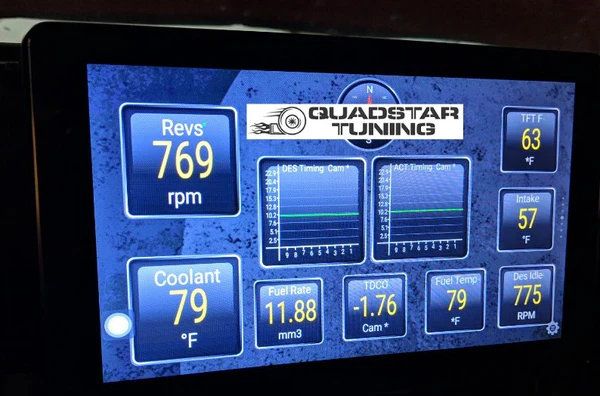
You can use any Android device for the task, but we chose to do a permanent install on this truck. The specific head unit we used for this installation in the 1995+ style dash was the Joying single din Android 8.0 8" unit. It allowed us to adjust the depth and height perfectly without obscuring any HVAC controls. You can buy the radio and installation kit pieces here:
There are multiple other sizes and styles of these head units available from Joying. The following will allow you to browse and customize to fit your needs, for example, into the 1994 and earlier dash. Keep in mind these models change frequently so it's hard for us to recommend an exact one.
Limitations
The ELM327 bluetooth adapters are not bi-directional scan tools so you can't send commands like the TDC Learn command. This is just a monitoring tool.
The torque app is only for ANDROID devices